
Using a BGA machine for laptop repair requires more than a temperature recipe. Corner adhesive may keep a component attached after its solder joints release, while nearby plastic connectors can reach their damage limit before removal is complete. The safe decision depends on identifying both constraints before heating the board.
Begin with the exact motherboard revision and component construction. Photograph the site, confirm why removal is needed and establish what testing will be possible afterward. If the adhesive cannot be identified or a nearby part cannot be protected within its documented limits, the correct next step may be further investigation or board replacement.
Sometimes, but glued corners do not guarantee a reworkable assembly. The adhesive formulation, cure condition, geometry and underlying board structure determine whether a controlled removal method is available. Color and appearance alone cannot reliably identify the material. Seek assembly records, component guidance or an approved repair procedure before choosing a treatment.
Inspect the complete perimeter under magnification. Note adhesive extending beneath the edge, narrow access beside neighboring components and evidence of earlier cutting or overheating. A small visible dot can conceal a larger bond. If the board is valuable or the construction is unfamiliar, process development should use a suitable donor assembly before work on the repair unit.
A BGA rework station provides controlled heating and handling, but does not make every adhesive removable. Define stop conditions for unexpected resistance, package deformation or damage to solder mask. Do not treat the pickup head as a pry tool. Mechanical restraint must be addressed separately from solder melting.
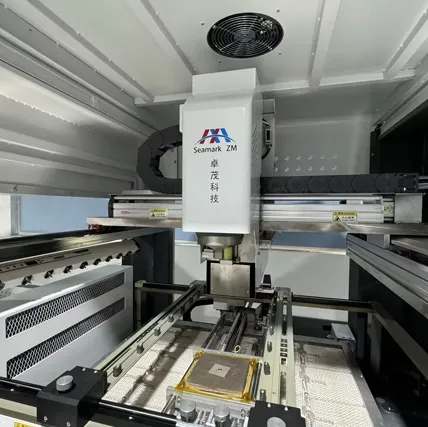
Corner bonding reinforces selected areas around a package. Full underfill occupies much more of the gap between the component and board, surrounding the interconnect region. These constructions create different access and separation problems. Removing a visible corner bead does not establish that the rest of the underside is free of resin.
Some adhesives are formulated for rework under specified conditions; others are not. Even with a reworkable material, the allowed softening or removal process must fit the package and board limits. If the resin requires conditions that damage adjacent parts or the laminate, its theoretical reworkability offers little practical benefit on that assembly.
Avoid probing blindly under the package or pushing a blade into the pad field. Such actions can cut traces, detach small components or damage pads that remain hidden until removal. Record the adhesive boundary and the method used to establish clearance. Where evidence suggests extensive underfill and no approved removal route exists, escalate the repair decision before adding heat.
Map the space required for the heating nozzle, pickup tool, viewing optics and vertical travel. Laptop boards often place display, keyboard, battery and fan connectors close to major BGAs. A tool that clears the package at rest may still strike a connector during positioning or transfer. Check the actual movement path with the unpowered assembly secured in its intended fixture.
Measure from the working tool envelope, including adjustment tolerance, rather than from the component outline alone. Consider parts on the underside: board supports and lower heaters may contact connectors or create concentrated loading. Support the board without forcing it flat against its natural shape or pressing on components.
When considering a hot air BGA rework station, verify whether an appropriate nozzle can deliver the required profile within the available clearance. A smaller nozzle is not automatically safer; it may heat the target unevenly or require a longer exposure. Tool access and thermal performance must be evaluated together.
Site constraint | What to verify before heating |
Connector beside the BGA | Tool clearance and connector temperature limit |
Adhesive at the package edge | Material identity and approved removal method |
Components below the repair site | Lower-heater clearance and support locations |
Shield or stiffener near the target | Heat-flow changes and access after removal |
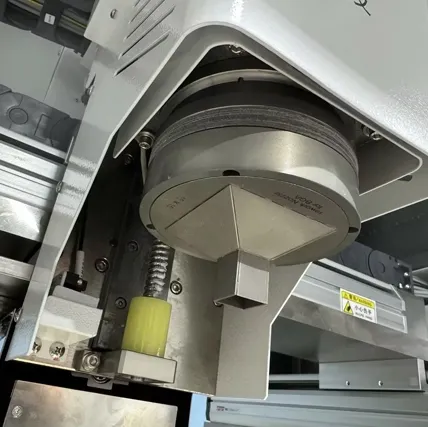
Disconnect power sources and follow the board's handling requirements before preparation. Remove detachable cables and assemblies where the approved procedure permits it. A battery or cable left in the work area introduces constraints that a local heat shield cannot resolve. Preserve connector locks and orientation marks so reassembly does not create a second fault.
Heat protection needs measurement, not only a visual barrier. Shields can reduce direct exposure but also redirect airflow or change the target's heating rate. Tape used to hold a shield does not prove that the protected connector stays below its allowable temperature. Use materials rated for the process and position them without bridging contacts or trapping contaminants.
Characterize the target and vulnerable nearby locations during development on a representative assembly. Include bottom heating and accumulated dwell, since connectors can warm through board conduction even when shielded from the upper nozzle. If acceptable target reflow and acceptable connector exposure cannot be achieved together, consider authorized connector removal or a different repair route.
Do not adopt a generic peak temperature as a guarantee for all laptop plastics. Component specifications may describe brief production exposure under conditions that differ from prolonged local rework. Document the conditions actually demonstrated and reassess them whenever the nozzle, shield or board revision changes.
Allow controlled cooling before handling and inspect the exposed site under suitable magnification. Examine pads, solder mask, nearby passives and the adhesive removal area. Look for disturbed connectors, cracked housings, displaced contacts and damaged latch mechanisms. A connector can remain electrically connected while its mechanical retention has been weakened.
Check for lifted pads and surface damage, while recognizing that visual inspection cannot exclude every subsurface defect. Record the condition before site preparation so cleaning does not erase the evidence of how removal behaved. If laminate separation, pad cratering or a repeated unexplained fault is suspected, stop routine replacement and request a more suitable assessment.
After installing the component, use an appropriate BGA inspection system for the structural defects it can resolve, then test the board's required functions. Include the nearby connector circuits that experienced heat or handling. A successful boot alone may miss faults in charging, external display, keyboard, storage or cooling control.
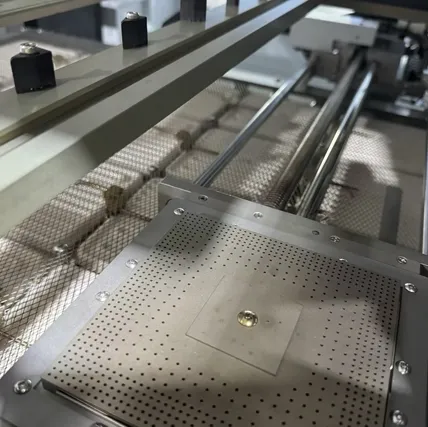
For a team that needs to rework laptop boards repeatedly, the most useful record links board revision, component identity, adhesive treatment, thermal recipe, shielding arrangement and final test results. This makes a later recurrence diagnosable and prevents a successful repair on one variant from becoming an unsupported default for every motherboard.
Consider a board with a tall cable connector immediately beside one package edge. The nozzle clears the connector, but a temporary shield reduces the air path and slows heating at that edge. Extending dwell may then increase connector exposure through the PCB. The appropriate development step is to measure both locations and reconsider the arrangement, rather than accepting the shield because it looks substantial.
Keep the validated shielding arrangement reproducible through photographs and identified materials. Include where the board is supported and which detachable items were removed. A sketch or photograph cannot replace a thermal record, but it helps ensure that the measured arrangement is the one technicians actually repeat on later boards of the same revision.
Only where an approved procedure permits it and the material can be accessed without harming the board. Cutting visible glue does not establish that hidden resin is absent. Unknown construction calls for investigation before lifting.
Not by itself. Tape may help position protection, but its presence does not measure the connector's temperature or prevent heat conduction through the PCB. Validate the complete arrangement under the actual profile.
No. Access, board condition, adhesive type, replacement-part availability and post-repair test coverage can make a board unsuitable. Equipment capability should be matched to the assembly rather than used as the sole reason to proceed.
Assess its condition and specifications. Deformation, damaged retention or suspect contacts can justify replacement even when a brief electrical check passes. Use the applicable acceptance criteria and document any additional work.
Select a BGA machine for laptop repair as part of a process that accounts for adhesive restraint, tool clearance and nearby component heat exposure. Confirm the construction before removal, measure the shielding arrangement and inspect both the repair site and surrounding circuits afterward. Seek engineering review when a controlled removal method or adequate post-repair verification cannot be established.
· NASA Glenn Research Center: Component-Level Electronic-Assembly Repair (CLEAR) Operational Concept
· NASA / Jet Propulsion Laboratory: NASA Guidelines for BGA and DSBGA Selection and Application
· IPC / Global Electronics Association: Effects of BGA Rework Cycles on PCB Assembly Reliability
 EN
EN
 es
es  ko
ko  de
de  it
it  pt
pt  th
th  ar
ar  pl
pl  vi
vi  tr
tr  ru
ru